
Mac Free Screen Recorder'ı İndir – ücretsiz Mac ekran kaydı aracı, HD video, kolay düzenleme
Overview
Mac Free Screen Recorder by Amazing Share is a lightweight yet powerful screen‑recording solution designed exclusively for macOS users who need a reliable way to capture on‑screen activity without paying a premium. Whether you’re creating tutorial videos, documenting software bugs, or preserving epic gaming moments, this free utility records every pixel, system sound, and microphone input with crystal‑clear fidelity. The program supports all recent Mac hardware—including MacBook Air, MacBook Pro, iMac, Mac mini, and the latest Apple Silicon models—so you can start recording straight out of the box.
Output files are saved in industry‑standard HD MP4 format, which guarantees compatibility with most video editors, social platforms, and cloud storage services. The interface follows macOS design conventions, offering a clean toolbar, intuitive hotkeys, and a minimal learning curve. For users who need more advanced capabilities, an optional paid upgrade unlocks features such as extended recording time, priority support, and a 30‑day money‑back guarantee.
Because the core version is free, there are no hidden fees, trial limitations, or intrusive watermarks, making it an excellent choice for students, freelancers, and small businesses alike. In addition to basic screen capture, Mac Free Screen Recorder provides picture‑in‑picture (PiP) recording, allowing you to overlay webcam footage onto your screen video—a handy feature for live‑streamers and content creators. Trim‑capture tools let you define exact start and end times, ensuring that only the most relevant footage is saved.
Overall, the application balances simplicity with a robust feature set, delivering a secure, fast, and fully functional screen‑recording experience for macOS users.
Temel Özellikler ve Yetkinlikler
- Tam ekran ve pencere düzeyinde yakalama, isteğe bağlı özel bölge seçimi ile.
- Sistem sesinin, mikrofon girişinin ve harici cihazların eşzamanlı kaydı.
- Ekran kaydı sırasında webcam yerleşimi için resim içinde resim (PiP) modu.
- HD MP4 çıktısı (1080p'ye kadar) macOS, Windows, iOS ve Android'de anında oynatılabilir.
- Kesin başlangıç/bitiriş zaman damgaları için yerleşik video kırpma aracı.
- Birden fazla kaydı tek sorunsuz video dosyasında birleştir.
- Grafik yoğun oyunlar için düşük gecikmeli kayda optimize edilmiş oyun yakalama modu.
- macOS 10.12 Sierra ve sonrası, Apple Silicon (M1/M2) çipleri dahil destek.
- 30 MB'den küçük hafif kurucu, kapatıldıktan sonra arka plan hizmeti yok.
- Ücretsiz temel sürüm, isteğe bağlı ücretli yükseltme (USD 29.99) ve 30‑gün para iade garantisi içerir.
Each of these features has been crafted to address the most common recording scenarios faced by Mac users. The ability to capture both system and microphone audio eliminates the need for external mixers or virtual audio cables, streamlining the workflow for podcasters and educators. Picture‑in‑picture functionality is especially valuable for tutorial creators who wish to appear on camera while demonstrating software steps.
The video merging tool saves time by allowing users to combine several short clips—perhaps captured across multiple sessions—into a single polished output without requiring third‑party editing software. For gamers, the low‑overhead game‑capture mode records high‑frame‑rate gameplay while maintaining smooth performance on the host machine. Finally, the free tier is genuinely free: there are no time‑limited trials, no watermarks, and no hidden ads, ensuring that users can rely on the tool for both personal and professional projects.
Kurulum, Kullanım ve Uyumluluk
Getting started with Mac Free Screen Recorder is straightforward. Follow these steps to install and begin recording in under two minutes:
- Visit the official Amazing Share website and click the “Download for macOS” button. The installer file (MacFreeScreenRecorder.dmg) is less than 30 MB.
- Open the .dmg file and drag the application icon into your Applications folder.
- Launch the program; macOS will prompt you to allow screen‑recording permissions. Navigate to System Settings → Privacy & Security → Screen Recording and enable the checkbox for Mac Free Screen Recorder.
- Similarly, enable microphone access under Privacy & Security → Microphone if you plan to capture voice narration.
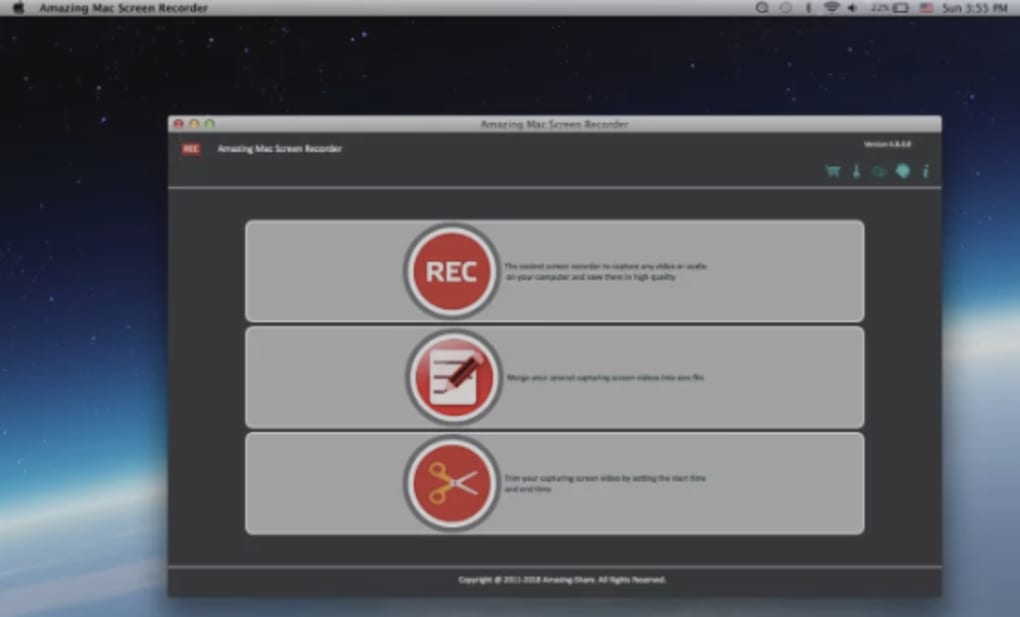
- After granting permissions, the main window appears with a simple toolbar: Start Recording, Pause, Stop, and Settings.
To record, choose your capture mode (Full Screen, Window, or Custom Region) and click the red Record button. If you need PiP, enable the webcam overlay from the Settings panel and position the preview window where you prefer. Use the Trim Capture fields to set exact start and end times, or simply stop the recording manually when finished. The resulting MP4 file is saved to the default ~/Movies/MacFreeScreenRecorder folder, though you can customize the destination in the Preferences menu.
Compatibility: The software runs on macOS 10.12 Sierra, 10.13 High Sierra, 10.14 Mojave, 10.15 Catalina, macOS 11 Big Sur, macOS 12 Monterey, macOS 13 Ventura, and the latest macOS 14 Sonoma. It also supports Apple Silicon (M1, M2, and later) natively, delivering the same performance as Intel‑based Macs. No additional drivers or third‑party codecs are required, and the application works alongside popular video editors such as Final Cut Pro, iMovie, and Adobe Premiere Pro.
For power users, command‑line options are available to launch recordings via Terminal, making it easy to integrate into automated workflows or scripting environments. The official tutorial library on the Amazing Share website provides video walkthroughs for each major feature, ensuring that even beginners can master the tool quickly.
Artılar, Eksiler, SSS ve Son Değerlendirme
Artılar
- Su işareti veya zaman sınırlaması olmayan tamamen ücretsiz temel sürüm.
- Anında paylaşım için yüksek kaliteli HD MP4 çıktı.
- Tek bir işlemde tam sistem ve mikrofon ses kaydı.
- Profesyonel görünümlü eğitimler için resim içinde resim webcam yerleşimi.
- Hafif kurucu ve düşük CPU kullanımı, oyun kaydı sırasında bile.
- Apple Silicon yerel desteği, M serisi Mac'lerde sorunsuz performans.
Eksiler
- Ücretsiz sürüm, açıklama veya geçiş efektleri gibi gelişmiş düzenleme araçlarından yoksundur.
- Öncelikli destek ve zaman zaman özellik talepleri için ücretli yükseltme gereklidir.
- Yerleşik bulut depolama entegrasyonu yok; kullanıcıların manuel olarak yüklemesi gerekir.
Sıkça Sorulan Sorular
Mac Free Screen Recorder gerçekten ücretsiz mi yoksa su işareti ekliyor mu?
Temel sürüm tamamen ücretsizdir ve kaydedilen videoya su işareti eklemez. Tüm çıktı dosyaları, yayınlamaya hazır temiz MP4 dosyalarıdır.
Performansı etkilemeden oyun kaydedebilir miyim?
Evet. Uygulama, donanım hızlandırmalı kodlama kullanan düşük gecikmeli oyun yakalama moduna sahiptir ve çoğu modern Mac'te kare hızını sabit tutar.
Yazılım Apple Silicon Mac'lerde çalışıyor mu?
Kesinlikle. Mac Free Screen Recorder, M1, M2 ve sonraki çiplerde yerel olarak çalışır ve Intel tabanlı Mac'lerdeki aynı özellik setini sunar.
Mikrofon kaydını nasıl etkinleştiririm?
Ayarlar panelini açın, “Microphone” seçeneğini açın ve macOS izni istendiğinde verin. Etkinleştirildiğinde sesiniz sistem sesinin yanında kaydedilir.
Ücretli yükseltme için iade politikası var mı?
Evet. Ücretli sürüm ($29.99) 30‑gün para iade garantisiyle gelir. Memnun değilseniz, tam iade için destekle iletişime geçin.
Sonuç ve Eylem Çağrısı
Overall, Mac Free Screen Recorder stands out as a secure, fast, and genuinely free screen‑capture solution for anyone working on a Mac. Its ability to record system audio, microphone input, and webcam footage in HD MP4 format without watermarks makes it a practical tool for both casual and professional users. If you need a reliable recorder today, simply download the installer, grant the required permissions, and start capturing within minutes. For those who require additional support and premium features, the $29.99 upgrade offers a risk‑free trial backed by a 30‑day money‑back guarantee. Take advantage of this free tool now and elevate your video content without breaking the bank.







